


iHeartRadio has been part of the audio world for many years, and it continues to grow as people shift from traditional radio to online platforms. Many users know it for its live radio stations, while others use it for podcasts or personalized music playlists. With so many streaming choices today, it makes sense to look closely at what iHeartRadio actually offers, what it does well, and where it falls short.
This full review is written to give clear explanations, simple wording, and helpful insights. It includes examples, tips, expert-style reflections, and comparisons that can help you decide if this platform is right for you.
What Makes iHeartRadio Different in the Audio Streaming Market
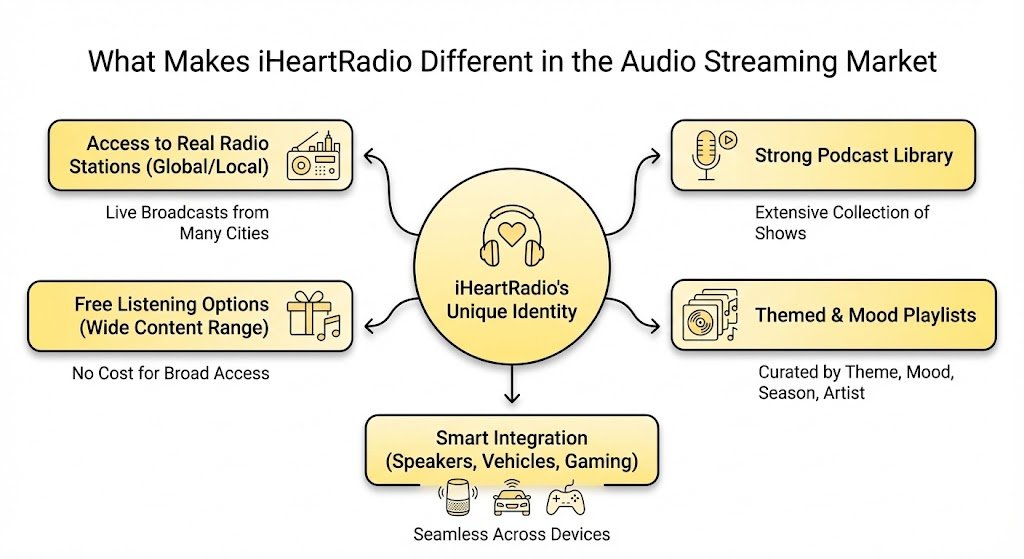
iHeartRadio stands out because it mixes classic radio with modern streaming features. While many apps focus mainly on music playlists, iHeartRadio keeps local and national radio as its core feature. This gives users a feeling of familiarity and makes it easy to switch from regular radio to the app without losing that radio-style experience.
Below is a breakdown of how it sets itself apart.
List of features that create its identity
• Access to real radio stations from many cities
• Strong podcast library
• Free listening options that still give a wide range of content
• Music playlists created by theme, mood, season, or artist
• Integration with smart speakers, vehicles, and gaming consoles
iHeartRadio with common streaming platforms
| Feature | iHeartRadio | Spotify | Apple Music |
|---|---|---|---|
| Live Radio Stations | Yes | No | No |
| Free Tier | Yes | Yes | No |
| Podcasts | Yes | Yes | Yes |
| Custom Radio Playlists | Yes | Yes | Yes |
| Local Radio Feel | Strong | Weak | Weak |
A senior audio content advisor once explained that iHeartRadio keeps a strong lead in traditional radio integration because it controls many of the stations people listen to every day. This gives it a natural advantage when connecting old radio habits with new technology.
How Easy It Is to Use iHeartRadio for Daily Listening
The layout and controls of an app can shape how often people use it. iHeartRadio is designed in a way that helps even new users feel comfortable quickly. It avoids complicated menus and focuses on a simple home screen that guides you to stations, playlists, podcasts, and recommendations.
Helpful areas of the app for beginners
• The home screen highlights recently used stations
• Station search lets you type a city or call letters
• Podcast tab organizes shows in clear rows
• Playlist suggestions appear based on your listening
• The “All Access” and “Plus” sections describe paid options simply
The learning curve for various user groups
| User Type | Experience with iHeartRadio |
|---|---|
| First-time listener | Easy and fast to learn |
| Older users | Simple, clear layout |
| Car listeners | Smooth station switching |
| Podcast fans | Easy browsing but fewer advanced controls than some apps |
If you use smart speakers, connect your iHeartRadio account right away. This makes hands-free listening easier and avoids having to repeat commands or logins later.
Strengths of iHeartRadio That Many Users Appreciate
Every audio platform has areas where it shines most. iHeartRadio has strong points that appeal to certain groups of listeners, whether they prefer live shows, talk content, or simple background audio.
Below are the most valued strengths.
Live radio advantage
Radio remains the heart of the service. People can tune into stations from different regions, listen to morning shows, or follow breaking news. This makes it ideal for users who like the comfort of radio hosts and local updates.
Wide range of podcasts
iHeartRadio carries many top shows, especially in entertainment, crime, sports, and lifestyle. Since iHeart is also a major podcast producer, it has access to large names and exclusive releases.
Free access to many features
Even without paying, listeners can enjoy thousands of stations, playlists, and podcasts. The free tier includes ads, but the amount of content available makes it appealing for users who do not want another subscription.
Simple playlist curation
Instead of complex algorithms, iHeartRadio often uses theme playlists and artist-based stations. These offer straightforward listening choices without needing to manage many settings.
Cross-device compatibility
iHeartRadio works on phones, tablets, smart speakers, smart TVs, certain vehicles, wearables, and gaming systems. This flexibility helps people switch locations without losing access.
Quick list of strengths
• Reliable live radio playback
• Strong entertainment podcasts
• Free usage is meaningful, not limited
• Works on nearly any device
• Simple station and playlist system
Expert-style reflection
According to an audio technology consultant, iHeartRadio’s real strength comes from its ability to bridge old and new listening habits. While other apps focus on discovery algorithms, iHeartRadio focuses on convenience and familiarity.
Where iHeartRadio Falls Short and What You Should Know
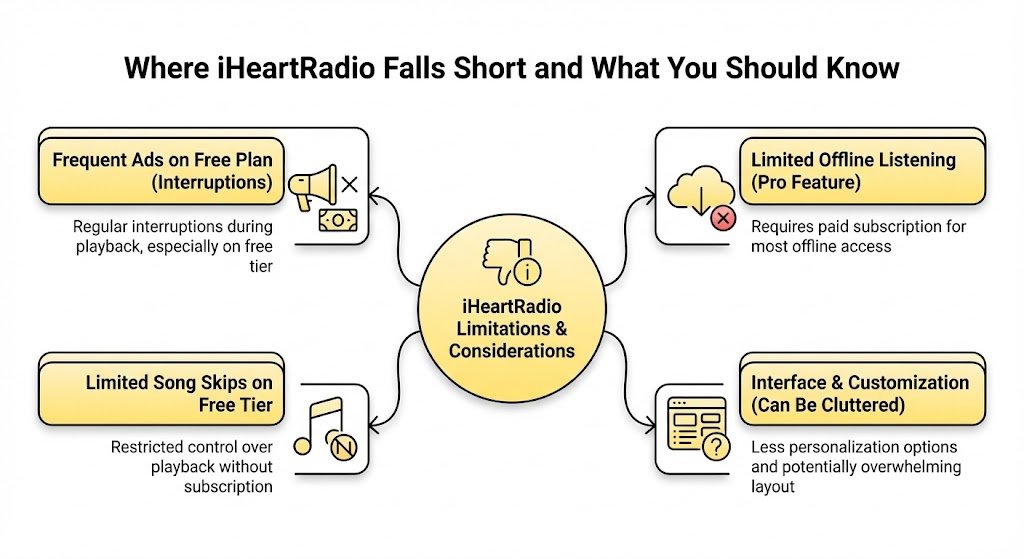
Even though iHeartRadio has many strengths, there are areas where it may not satisfy all listeners. Understanding these weaknesses helps set realistic expectations before deciding to switch or subscribe.
Weaker music customization
Compared to apps that refine playlists based on your exact listening patterns, iHeartRadio’s music experience may feel less tailored. Music lovers who enjoy constant fine-tuning may notice the difference.
Less variety in rare genres
Because iHeartRadio leans heavily on mainstream radio, niche genres sometimes have limited representation. Fans of underground or experimental music may not find the depth they want.
Ads in the free version
The free tier comes with regular ads. Some are radio-style ads from the stations themselves, and others come from the app. Users who want non-stop music will need the paid version.
Offline listening mostly requires subscription
Without a paid tier, listeners cannot save content for offline use. This affects people who travel often or want to use the app with limited data.
• Basic music recommendations
• Ads in free listening
• Limited niche music options
• Offline listening only for paid users
• Some podcasts may not include full archives
Potential drawbacks
| Weakness | Explanation |
|---|---|
| Ads | Free tier includes audio ads |
| Music personalization | Less advanced than top competitors |
| Offline access | Requires paid plan |
| Show archives | Not all podcasts allow full replay |
| Niche music depth | May be limited in certain categories |
Features That Define the iHeartRadio Listening Experience
Beyond radio and playlists, there are several features that shape how listeners use the app daily. These features also help the platform stay relevant in a crowded streaming world.
Search functions
The search tool supports stations, artists, hosts, podcast names, and themes. This makes it easier for users who may not know exactly what they want but have keywords in mind.
Personalized suggestions
Although iHeartRadio does not rely on heavy algorithms, it still offers suggestions based on recent activity. These suggestions are simpler but still helpful.
Artist radio stations
These stations play songs from your chosen artist plus similar music. They are easy to use and give predictable results.
Podcast tools
Users can follow shows, download episodes with a subscription, or browse by topic. The platform supports large podcast networks, giving listeners access to popular names.
Device support
The app works in many home and travel environments. Car integration is one of its strongest areas.
List of defining features
• Keyword search for quick matches
• Radio-style artist stations
• Podcast folders and categories
• Syncing across multiple devices
• Auto-play options that continue content
Showing feature usefulness by user type
| Feature | Best For |
|---|---|
| Live radio | Users who enjoy hosts and talk shows |
| Artist stations | Listeners who want simple background music |
| Podcast categories | People who prefer browsable topics |
| Device syncing | Multi-device households |
| Free tier | Listeners avoiding subscriptions |
Tips for Getting the Best Experience Out of iHeartRadio
Many users stick to the basic functions of the app, but there are ways to get better results and improve daily convenience. Below are helpful tips based on user observations and expert-style advice.
Helpful tips
• Use station favorites to organize lists if you travel between cities
• Try themed playlists during work hours for steady background sound
• If you enjoy podcasts, follow the show to get new episodes quickly
• Connect iHeartRadio to your car’s system to reduce manual controls
• Use the sleep timer feature if you listen at night
Examples of ways listeners improve their experience
Example of morning use
A listener chooses a local news station every morning to stay updated, then switches to a light music playlist during work hours. This helps transition between tasks while keeping audio simple.
Example of family use
Parents use the kids section for story podcasts or gentle songs, helping create a calm routine before bedtime.
Expert-style insight
A radio content strategist explained that listeners get more value when they treat iHeartRadio as both a live radio tool and a podcast hub. This dual approach helps people mix real-time audio with on-demand choices.
Honest Look at iHeartRadio’s Paid Plans and Whether They Are Worth It
iHeartRadio offers two paid options: iHeartRadio Plus and iHeartRadio All Access. These plans aim to remove ads and give more control over the listening experience.
iHeartRadio Plus
This plan allows users to replay songs, save stations, and search for tracks more freely. It still feels radio-based but with added flexibility.
iHeartRadio All Access
This is the full subscription level. It allows playlist creation, unlimited skips, offline listening, and full on-demand music access. This option is closer to traditional music streaming apps.
List of what the paid plans add
• No ads during music sections
• Unlimited song skips
• Replay features for selected songs
• Offline listening options
• Ability to build playlists manually
Free vs paid tiers
| Feature | Free Version | Plus | All Access |
|---|---|---|---|
| Ads | Yes | Fewer | None during music |
| Skips | Limited | More | Unlimited |
| Song replay | No | Yes | Yes |
| Playlists | Basic | Improved | Full creation |
| Offline listening | No | No | Yes |
Expert-style view
A subscription specialist noted that iHeartRadio’s All Access plan is most helpful for users who want both radio and a full music streaming experience. If someone mainly listens to podcasts or live radio, the free version may already be enough.
Podcast Experience on iHeartRadio: What You Should Expect
Podcasts are one of the strongest parts of the platform. Since iHeart is one of the world’s largest podcast publishers, its app receives early access to many shows and special episodes.
What stands out in the podcast experience
• Quick updates when new episodes drop
• Large selection of entertainment and true crime shows
• Exclusive series produced by iHeart’s own studios
• Easy browsing with clear categories
• Guest interviews with well-known public figures
List of popular podcast categories
• Comedy
• Crime
• Business
• History
• Health
• Culture
• Stories for kids
Podcast listening example
A listener who enjoys crime stories may start with one of the top iHeart shows, follow the series, and receive notifications for new episodes. They may also get suggestions for related series from the same creators.
Expert-style comment
A podcast producer shared that iHeartRadio succeeds because it has strong partnerships with creators, letting listeners find well-crafted shows without digging through large menus.
How iHeartRadio Performs in Real-World Listening Situations
The true test of any audio service is how it works outside of controlled environments. Users often depend on the app while driving, working, or exercising.
Driving performance
iHeartRadio connects smoothly with many vehicle systems. Switching stations is easy, and stable radio streams help reduce buffering while in motion.
Work and study environments
Simple playlists work well for background sound, especially for people who do not want to fine-tune settings all day.
Home use
Smart speaker integration makes daily listening hands-free. Families can play kid-friendly content or music during meals.
Fitness or outdoor use
Since offline listening requires a paid plan, some users may need mobile data for workouts. Podcasts, however, are convenient for long walks or slow-paced fitness sessions.
Situations and performance table
| Situation | Performance Summary |
|---|---|
| Driving | Smooth connection and simple controls |
| Working | Good for steady background audio |
| Home | Great for smart speaker use |
| Fitness | Better with paid offline features |
| Travel | Best with playlists or stations favored beforehand |
Who Benefits Most from Using iHeartRadio
Different apps are better suited to different people. iHeartRadio appeals strongly to those who grew up with radio or prefer simple listening.
Groups that benefit the most
• Users who enjoy live radio hosts and real-time talk shows
• People who want free listening options
• Podcast fans who prefer popular mainstream creators
• Families who want an easy app with simple controls
• Older users who want familiar radio stations
• Commuters who rely on hands-free listening
Groups who may not find it ideal
• Users who want highly tailored music discovery
• Listeners who prefer rare or underground genres
• People who want full offline access without paying
• Audiophiles who need high-resolution sound formats
Expert-style thought
A digital media advisor stated that iHeartRadio suits listeners who think of audio as a routine part of daily life, not something they constantly tweak. This makes it strong for general listening but less suited to heavy music enthusiasts.
Why Some Users Prefer iHeartRadio Over Other Apps
There are several reasons why iHeartRadio remains popular despite competition.
Reasons people stay loyal
• Familiar radio structure
• Easy switching between live and on-demand content
• Friendly layout
• Strong talk content
• Trust established brands and radio hosts
| Motivation | Why It Matters |
|---|---|
| Routine | People follow morning shows or news |
| Comfort | Familiar radio voices |
| Variety | Thousands of stations from many cities |
| Free listening | Low commitment |
| Podcast library | Access to major shows |
Someone who listens to a beloved morning host may keep using iHeartRadio simply because it allows them to follow the host even after moving to a new city.
Areas Where iHeartRadio Could Improve in the Future
Even with its strengths, there are areas where users hope for updates.
Possible improvements
• Better music personalization
• Expanded rare genre collections
• More flexible offline features in lower-tier plans
• Higher-quality audio formats
• More detailed podcast sorting tools
Expert-style projection
Industry specialists predict that iHeartRadio may continue to build its podcast empire rather than try to compete head-to-head with major music apps. This means the platform may grow more in talk content than music-focused tools.
Final Thoughts
iHeartRadio offers a steady, familiar listening experience that works well for many people. It shines in radio and podcasts, keeps things simple, and offers free access without major barriers. While it may not satisfy the needs of serious music collectors or users who want highly tuned algorithms, it works well for everyday listening.

