


Here’s the thing nobody tells you about relocating an office the truck is the easy part. Any competent crew can carry desks down Ventura Boulevard. What actually goes wrong in a commercial move, the thing that turns a weekend project into a two-week crisis, almost always lives in the network closet. Phones that don’t ring Monday morning. A server that got powered down before anyone confirmed the cloud backup finished. An executive standing at a new desk asking for the Wi-Fi password that nobody wrote down.
I’ve watched companies plan the furniture down to the inch and treat connectivity as an afterthought, and it’s exactly backwards. So this is the playbook in the order that actually matters: data first, people second, furniture last, with the Sherman Oaks-specific friction, the permits, the building rules, the boulevard itself, built into the schedule instead of discovered on moving day.
Your Internet Contract Sets the Timeline, Not Your Lease
Before a single box gets packed, look at two dates: when service goes live at the new address, and when it dies at the old one. If those dates touch, you have a problem.
The single most protective decision in the whole move is the parallel run: keep both locations on live, verified internet service for at least 72 hours of overlap, and a full week is better. ISP installations at commercial addresses miss their windows constantly, and low-voltage work has a way of revealing surprises inside older Ventura Boulevard buildings. If the new circuit is late and you’ve already scheduled the old one’s disconnect, your business is dark and there is no amount of hustle that fixes it over a weekend.
While you’re at it, get the invisible work done absurdly early:
- Network drops, server rack space, and cabling finished about 30 days out, before furniture arrives, because pulling cable around installed desks doubles the labor
- Smart access and security systems configured and tested while the space is still empty
- A cloud buffer in the final week: back up local servers to a secure cloud environment and shift customer-facing workflows to cloud systems, so the physical hardware can power down without your business noticing
That last step is what separates a move from an outage. If your operations can run for 48 hours with the servers in a truck, the weekend belongs to you.
Move the People in Waves, Not All at Once
The all-hands, everybody-moves-Saturday approach feels efficient and fails predictably, because every problem surfaces simultaneously with nobody settled enough to fix anything.
Split the workforce into two tiers instead. Support and secondary teams go first, midweek. They work from the new space for a few days and, in doing so, find the dead outlets, the printer that won’t join the network, and the conference room where the video call audio echoes. Core operations and the executive group move over the weekend, arriving to a space where the bugs have already been found by someone else. The first wave is, honestly, a paid quality-assurance pass, and it’s worth every hour.
The Weekend Sequence, In the Order That Prevents Disasters
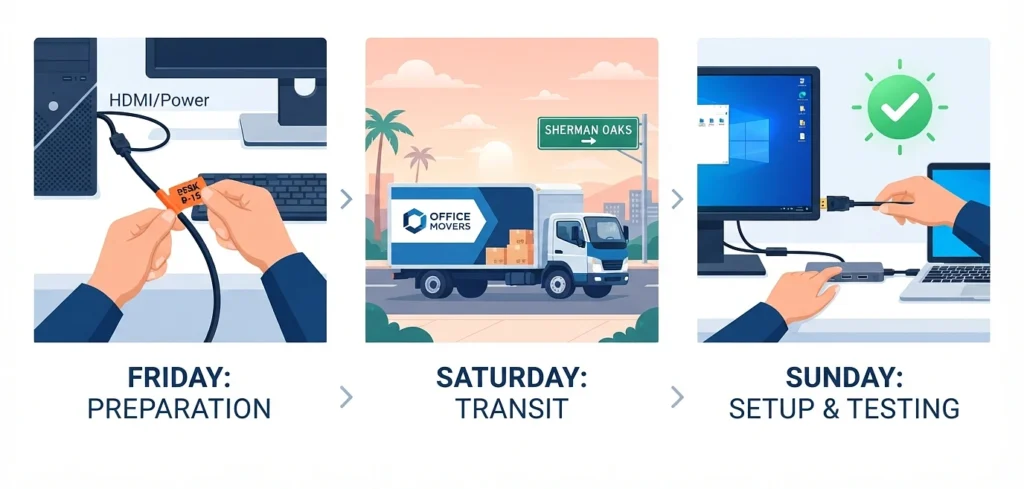
The order below isn’t a preference, it’s a dependency chain. Each step protects the one after it.
- Friday, 6 p.m., the tech teardown. Disconnect workstations with every cable, dock, and monitor labeled against a color-coded map of the new floor plan. Twenty minutes of labeling on Friday saves three hours of guesswork on Sunday, and it’s the difference between “plug in and go” and a help-desk queue on day one.
- Saturday, 7 a.m., heavy transport. Furniture and crated equipment roll early, before the boulevard wakes up. Saturday morning exists for this exact purpose; more on the local traffic logic below.
- Sunday, 9 a.m., reconnect and audit. Reassemble IT, then stress-test everything people will touch Monday: Wi-Fi under load, video conferencing, phones, print. The audit is the step companies skip when they’re tired, and it’s the step Monday morning depends on.
If a step slips, slide the whole chain rather than reordering it. Servers get damaged and teams get stranded precisely when someone decides the furniture can go before the network is verified.
The Sherman Oaks Specifics
This is the part national checklists miss, and it’s where local moves get expensive.
Ventura Boulevard and the Clock:
Weekday moving on the boulevard means trucks idling in gridlock while hourly labor charges run. Saturday morning before 9 a.m. is the golden window: light traffic, open curb space, and a full day of margin if something runs long. If your building only allows weekday freight access, aim for the earliest slot the property manager will grant.
Curb Space Is a Permit, Not a Hope:
If trucks need to stage on the street rather than in a private loading area, the City of Los Angeles issues temporary no-parking permits through LADOT, which get red-and-white tow-away signs posted at your curb ahead of the move. The city’s own guidance says to contact LADOT at least five working days before your date, and in practice you want closer to two or three weeks of lead time, because there’s paperwork, fees, and sign posting to schedule. Two things people learn the hard way: the signs typically go up 24 to 72 hours in advance, and the permit doesn’t override red curbs, hydrants, street cleaning, or existing no-stopping zones, so scout the exact curb segment before you apply.
Your Building Has Rules, and So Does the New One:
Managed commercial buildings on this corridor commonly restrict freight elevator hours and loading dock access, and both your current and destination buildings get a say in your schedule. Book the freight elevator weeks ahead, in writing, at both ends.
And here’s the requirement the original planning documents almost always omit: the certificate of insurance. Most managed buildings require your moving company to provide a COI naming the building and its management company as additionally insured before crews are allowed through the door. No COI, no entry, and it’s enforced. Ask your building management for their exact COI requirements when you book the elevator, hand those requirements to your mover at booking time, and get the certificate submitted days before the move, not the morning of.
While you’re checking paperwork, verify the mover itself: California intrastate movers should hold valid state operating authority and insurance, and any crossing of state lines requires a USDOT number you can look up federally. A mover who hesitates on either question is telling you something.
Garages and Clearance:
A lot of Sherman Oaks commercial parking sits underground with tight ramps and low ceilings. Get the exact clearance height of the loading area in writing from the property manager, and give that number to your mover so they bring appropriately sized trucks. A truck that doesn’t fit the garage turns into a long hand-carry across a parking lot, billed by the hour.
The Three Things Everyone Forgets
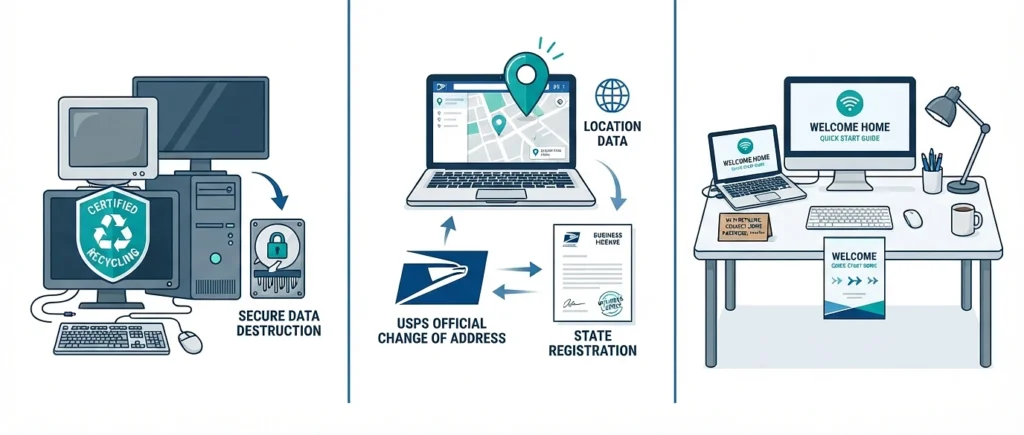
Old electronics are a legal obligation, not trash. A move is when companies discover a storage room of dead monitors, towers, and drives. California requires electronic waste to be recycled through proper channels rather than dumped, and the drives deserve more than deletion: use a certified data-destruction service and keep the certificate, especially if you handle client data. A hard drive in a dumpster is a breach waiting for a finder.
The address lives in more places than the letterhead. File the commercial change of address with USPS, then update the ones that quietly matter: Google Business Profile, business licenses, insurance policies, bank and merchant accounts, payroll, and every vendor with an auto-ship. A month of misdirected mail and a wrong map pin costs more than the hour this list takes.
Day one is the actual finish line. The test of the whole project is an employee walking in Monday at 8 a.m. and starting work without asking anyone anything. That means Wi-Fi credentials posted or pre-loaded, desks assigned before arrival rather than claimed in a scramble, monitors already docked, and one printed one-page guide at each seat covering network, phones, and printing. It sounds fussy. It’s the cheapest productivity insurance you’ll ever buy.

